
CAD drawings under floor plans, support and end-of-life tracking, Oxidized configs, a sidebar of your own
The architect's DXF or DWG under your racks at true scale, support and end-of-life tracking per device, Oxidized config backups, and a sidebar of your own.
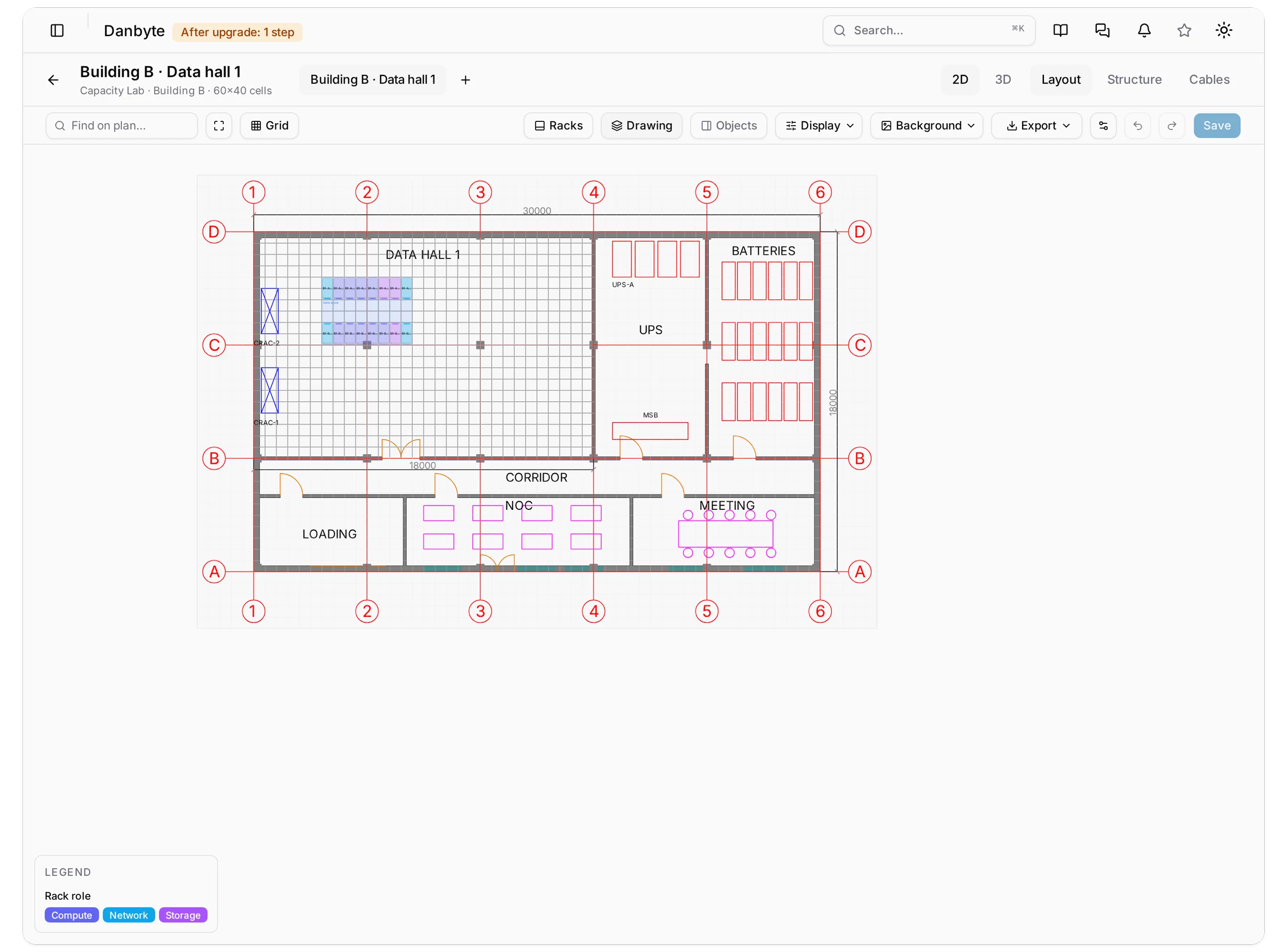
0.18 puts the building under the racks. A floor plan could already carry a background image; now it takes the drawing the building was designed in, a DXF or a DWG, under the grid at true scale, in 2D, in the 3D room and in a vector PDF.
The rest of the release answers three questions an auditor asks about a device. Is it under support: contracts and warranty dates, with a coverage status on every device and in the lists. Is its software still supported: platforms mapped to endoflife.date, with a status and a compliance check. What is its configuration: Danbyte reads it from your Oxidized server rather than backing it up itself. On top of that, a sidebar you arrange yourself, lists whose filters live in the address so a link carries them, and every bug reported since 0.17.2.
CAD drawings under floor plans
Background → Drawing → Upload drawing… takes a DXF, or a DWG when the server has a converter. The release bundle ships LibreDWG's dwg2dxf, so a fresh install or a bundle upgrade converts DWG with nothing to set up; DANBYTE_CAD_CONVERTER can point at the ODA File Converter instead. One background per plan, and a drawing and an image replace each other after a confirm.
A sample DXF of a 30 by 18 metre building under the grid: the data hall with its raised floor and CRAC units, UPS and battery rooms, the structural grid bubbles, and sixteen racks coloured by role.
The upload is processed in the background: queued, then ready or failed with the reason, with Reprocess and Remove beside it. Up to 50 MB, model space only. Xrefs, raster images, PDF, DWF and DGN underlays, OLE objects and wipeouts are skipped and counted, so you can see what was left out rather than wonder.
What makes it useful is true scale. The drawing's units line up with the grid's cell size, so a 600 mm floor tile in the drawing is one 600 mm cell, and a rack you place lands on the tile it will actually stand on. Fit grid to drawing moves the drawing to the corner and sizes the grid to it; over 512 cells a side it offers a cell size that fits instead.
 The same plan zoomed to the data hall: the two rack rows land exactly on the drawing's 600 mm raised-floor tiles.
A unitless drawing is treated as millimetres until you Calibrate it: click two points and type the distance between them. Drawn in overrides units the file gets wrong, and a drawing implausibly small or large for a floor plan, under 2 m or over 5 km across, gets a warning badge and a one-click fix for the unit that makes sense.
 An architect's DWG converted on the server: walls, doors, furniture, landscaping and elevations, drawn in the file's own colours.
flowchart LR
  U[Upload DXF or DWG] --> C{DWG?}
  C -- yes --> B[dwg2dxf in a bubblewrap sandbox] --> D[DXF]
  C -- no --> D
  D --> P[RQ worker: ezdxf reads model space, layers, units]
  P --> S[Sanitised SVG + layer list + extents]
  S --> V[Editor, 3D floor, PNG, vector PDF]
The DWG converter runs in a bubblewrap sandbox with no network and no access to the app directory, the .env or the media folder. Without a working bubblewrap, DWG uploads are refused outright. DXF is unaffected.
Layers
The Drawing panel lists the file's own layers with their colour and shape count, each with a tick to show or hide it. Layers marked Off or Frozen in the file start hidden. Hidden layers are saved with the plan and apply in 2D, in 3D and in exports, so the view you settle on is the view everyone gets.
 The Drawing panel on the sample DXF: thirteen layers with colour swatches and shape counts, placement with opacity, rotation and offset, and the scale with its source.
 The same plan with the grid bubbles, furniture, raised floor, room names and dimensions unticked: walls, doors, columns, CRAC, UPS and racks only.
Lines drawn in the default colour take the app's text colour, so a drawing reads in light and dark theme without being edited; colours too faint against the background only have their lightness moved, never their hue. Placement covers opacity, rotation in quarter turns and an offset in millimetres with one-cell arrows. Drawings over 60,000 shapes are shown as one server-rendered picture, and hiding a layer asks the server for a new render.
 The panel for a real DWG: nineteen layers with the architect's own Spanish names, one of them 29,114 shapes, four marked Off in the file.
On screen, on paper, and in the editor
The 3D room draws the drawing on its floor, with the same layers hidden.
 The 3D room: the drawing on the floor, the sixteen racks standing in the data hall in their role colours.
Export → PDF… is new: A4, A3, Letter or Tabloid, portrait or landscape, the plan fitted to the page and the drawing in vector rather than a picture of the screen. The footer carries a scale bar and ratio, the Color by legend, the source file and a title block with the plan, location, site, tenant, date, Danbyte version and page. Print prints the same PDF, and the PNG export carries the drawing too. Drawings over 60,000 shapes are refused on paper.
 Export: PNG, PDF and Print, with the paper size.
 The PDF dialog: one sheet with a title block, A4 to Tabloid, portrait or landscape.
The editor gains undo and redo, a hundred steps of tile edits, and multi-select: Shift or Ctrl/Cmd-click, Shift-drag to sweep, drag to move, arrows to nudge, Delete to remove. The bulk bar offers Front faces, Turn the selection, Set type… and Delete. Find on plan… matches a tile's label, its linked rack, device, cabinet or panel, its type or role, in any word order.
 Four racks selected with Shift-click, and the floating bar that appeared for them.
Support and warranty coverage
Nothing here is pre-filled or fetched from a vendor. You enter or import the contracts and the warranty dates, and a device's status follows from them (#421).
 A Cisco Smart Net contract: its term, the reseller and cost, the notification channels, and the twenty devices it covers.
DCIM → Support contracts holds one contract per manufacturer, with a contract number unique to that manufacturer, a service level in your own words, a start and an end (the end is the last covered day; leave it blank for open-ended), the reseller, cost and currency, a vendor portal link, renewal notes, notification channels, tags, custom fields, documents, a journal and a change log. A contract is Active, Expiring when its end falls inside the warning window, or Expired.
 The contracts list: expired, expiring and active, each with its manufacturer, service level, end date and device count.
 The same list with its filter rail: manufacturer, service level, state and tags.
Adding devices works two ways. Pick several from the list, or paste Serial numbers, one per line, case-insensitive. Serials that match nothing, and serials that match more than one device, are listed back to you: nothing is guessed.
 A contract's Devices tab, each device with its coverage state, type and site.
 Add devices by serial number, one per line.
A device's Warranty end counts as coverage on its own, so gear that was never on a contract still reports honestly. The status is computed on read from the latest end among a device's contracts and its warranty: Covered, Expiring, Expired or Not covered. The warning window is 90 days by default, and a tenant admin can set it anywhere from 1 to 730.
 A firewall whose Palo Alto support ends next month: Expiring, with the contract behind it.
 A core switch covered to 2027.
It shows up where you would look for it: on the device Overview, as a Coverage column and facet on the Devices list, in a dashboard widget, and as a compliance check that fails on expired or uncovered devices, optionally on expiring ones too, and optionally only for a tag. A contract with notification channels announces itself once when it enters the window and once when it expires, and the daily digest lists contracts ending soon or ended in the last thirty days.
 The Devices list with the Coverage column and its facet in the rail.
 The warning window on Tenant policy.
One thing is deliberately not for everyone: a contract's cost needs the new view cost permission, in the API, in exports, in columns, on the form and in the change log.
End-of-life data
The other half of the audit question is whether the software is still supported. 0.18 can map a platform to a product and release cycle from endoflife.date (#8). It is off by default and the switch is deployment-wide.
 A platform mapped to its endoflife.date cycle: released, active support until, end of life and the latest version, beside the manual lifecycle card.
Settings → General → End-of-life data takes the source, an optional mirror URL that goes through the outbound guard, a warning window of 180 days by default, and Refresh now. An airgapped install leaves the URL blank, saves the catalog on a connected machine and uses Import file; a daily timer keeps a connected one current and does nothing while the feature is off.
 The End-of-life data card: enabled, the source and window, the cached product count, and the offline import.
Nothing is mapped on its own. A platform's End of life card has a Map button that asks for a product, searchable and with suggestions that are never applied by themselves, and a cycle that is preselected from the platform's name. The released date, active support date, end-of-life date, latest version and LTS flag all come from the catalog.
Status is Supported, Support ending, End of life or Unknown, computed on read, and appears on the platform page and as an End of life column and facet on the Platforms, Devices and Virtual machines lists while the feature is on.
 A platform whose support ends in 2027: Support ending.
 The Platforms list with the End of life column: mapped platforms report, unmapped ones read Unknown.
 The same column and facet on the virtual machine list.
There is a compliance check to go with it, End-of-life status, which can fail on End of life, on Support ending or ended, or on having no data at all, across devices and VMs.
 Compliance filtered to critical: four VMs failing a rule that says VMs run a supported OS.
This sits beside the manual OS lifecycle fields rather than replacing them; neither overwrites the other.
Config backups from Oxidized
Danbyte does not back up configurations. It reads them from an Oxidized server and shows them where you are already looking (#35, #384, #385).
The integration is off by default and per tenant. Switched on, Integrations → Oxidized holds the connection: the oxidized-web URL, optional basic-auth credentials with a write-only password, TLS verification, and the matching rule, by address then name, address only, or name only. Test counts nodes and Sync nodes reads the node list and pairs nodes with devices and with VMs.
 Oxidized config backups switched on under Settings, Integrations.
 The Oxidized page before a connection exists.
 Adding a connection: the URL, credentials, matching rule and the automatic sync interval.
Matching is where this kind of integration usually goes wrong, so it is deliberately cautious. An ambiguous match links nothing and lists the node as unmatched with the reason, and you can Pin it by hand. A new match for a node that was seen before is only proposed, and shows no config until somebody confirms it, so a namesake appearing in the inventory cannot silently redirect a device's configuration.
flowchart LR
  O[Oxidized - git output] -- nodes --> S[Sync every 5-60 min]
  S --> M{Match by address, then name}
  M -- one match --> L[Linked to device or VM]
  M -- none / several --> U[Unmatched: Pin by hand]
  M -- new match for a known node --> P[Proposed: Confirm]
  L --> T[Config tab: current, history, diff - with view config]
  O -. config text on open .-> T
A device or VM then gets Config → Config backup with three parts: Current, with find, copy, download, reload and Fetch now; History, listing date, author, message and commit with a diff to current; and a Diff between any two versions. History and diffs need Oxidized's git output.
Two things worth being clear about. Reading a config needs the new view config permission, held separately for devices and VMs, and no built-in role has it, Administrator included: you grant it deliberately. And the config text is never stored in Danbyte. It is fetched when you open the tab and cached for a minute in Redis.
A sidebar of your own, and lists that remember
Your own sidebar
Preferences → Sidebar switches whole sections off, opens one to switch single pages off, and drags sections and pages within their group, with a live preview beside it (#285). It saves to your account, so it follows you to every browser and every tenant. Hidden pages still open by link, by search and by bookmark, and nothing about your permissions changes: this is about the clutter you personally do not use, not about access.
 The Sidebar card: every section with a count and a switch, and the live preview beside it.
A right-click on a section header gives Hide section, with an undo, and Customize sidebar. Administrators can publish a tenant default under Settings → Table layouts, and a personal layout wins over it.
The filter rail
A facet with more than ten values now gets a search box and shows its eight most common values, with Show all for the rest; anything you have ticked stays visible regardless. Hovering a facet's name reveals an eye that hides it for that list, and the hidden ones are listed at the foot of the rail.
 The Devices rail: status, role with its own search box and Show all, platform, end of life, coverage and type.
 Typing in a facet's search box narrows it.
Filters that live in the address
Facets, the search box and the advanced filter are written into the address, one parameter per facet, comma-separated for any-of, q for the search box and expr for the advanced filter. Reload, Back, a bookmark and a pasted link all keep them, so /devices?status=active&tag=core is a thing you can put in a ticket.
 The Devices list filtered by status and site, with both restored from the address.
 A tag and a search term, both carried in the address.
Tags work the same way round: a tag chip in a list filters it, and a tag on an object's page opens that list filtered by it. Long detail tables, a rack's devices, a source's VMs, a device's interfaces, change logs and many more, get a search box that matches the words shown in the table, related names included. It filters the rows already loaded rather than asking the server again.
 A rack's Devices tab with a search term typed: eleven of twenty-two rows, beside the rack.
Pickers on object fields are searchable now and keep their colour badges (#276), and a checkbox multi-picker links several objects at once to a task, a maintenance impact, SLA members, ARP sources or a DNS name's addresses.
Bulk edit, VM groups and racks that move
Bulk edit on the routing and power lists
All seventeen routing lists get multi-select, Edit, and a delete whose preview lists what goes and what is kept (#313, #314). That is BGP instances, sessions and peer groups, OSPF, IS-IS, EIGRP, VTEPs, Ethernet segments, static routes, policies, prefix lists, communities, community and AS-path lists, keychains and BFD profiles, plus the routing tabs on devices, VMs, VRFs, ASNs and prefixes. Power panels and feeds get the same, and power panels gain a location.
 BGP sessions with three rows ticked and the floating bar.
 Editing three sessions at once: every field starts on Keep current.
Fields start at Keep current, one bad row refuses the whole edit rather than half-applying it, each row gets its own change-log entry, and anything over a thousand rows runs in batches.
 The same for power feeds.
VM groups
A VM group is a named set of VMs on one cluster: a Cloud Director vApp, a Proxmox resource pool, a vCenter folder, or one you make by hand (#98). Virtualization → VM groups lists them with their kind, cluster and site, a group has an Overview and a Virtual machines tab, clusters gain a VM groups tab, and the VM list gains a Group column.
 Five groups: a folder from a real vCenter sync, and four made by hand.
 A group's page: its kind, its cluster and its fourteen virtual machines.
 Its Virtual machines tab.
 A cluster's VM groups tab.
Sync fills them in. Cloud Director now reads NICs once per vApp instead of once per VM, which turns 5,000 VMs in 400 vApps into 400 requests rather than 5,000, so a large estate stays inside the sync timeout. Existing Proxmox and vCenter sources start syncing pools and folders on their next sync, and it can be switched off per source. A group never gates access to anything.
Moving a rack to another site
Move to site… takes a rack and every device in it to another site, and optionally a location, after a preview (#394). The preview names the devices going along, what will be cleared (floor-plan tile links), and what is blocking the move: cables leaving the rack, VLANs, addresses, feeds or clusters belonging to the old site, bay or stack members outside the rack, a rack of the same name at the destination, site-local catalog entries. The move is refused until those are dealt with, rather than half-done.
 A move refused: one power feed from the old site still delivers to this rack.
There is an API for it too, POST /api/racks/{id}/move/, with a dry_run parameter that returns the same preview.
SLAs: causes, templates, schedules and metrics
0.17 measured availability. 0.18 is about the paperwork around it.
Incident follow-up adds a Cause from the tenant's own catalog, a Ticket link, a Note and a Disputed flag to an incident row. None of it changes the figure: disputed time still counts, because an exclusion is the thing that takes time out of a measurement. It is allowed on frozen periods and it is change-logged.
 An agreement's Incidents tab: down time by cause above, then the incidents with their cause pills, tickets, disputes and notes.
 The same breakdown as an Overview card, with the disputed share called out.
 The causes catalog, which starts empty: each cause a colour pill with its count.
Templates hold a target, service hours, holidays, counting rules, latency objectives and credit tiers, and you pick one in the wizard or on the full form. Changes to a template do not spread by themselves: an agreement that Differs is brought in line with Sync, which lands as a new revision, so a closed period keeps the rules it ran under.
 Three templates: Bronze, Silver and Gold.
 The Gold template: its target, hours and counting, latency objectives and credits, with the agreements made from it.
Scheduled reports go out weekly on a weekday or monthly on a day from 1 to 28, at an hour you pick, covering the current or the last period, as PDF or CSV. They are sent by the danbyte-sla timer within fifteen minutes of the hour, retried while Failing, and there is a Send now.
 A monthly schedule: day one at 07:00, last period, as a PDF.
Metrics exports every stored period as CSV or JSON, with availability, target, state, coverage, down time, budget, burn, incidents and credit, and JSON adds the latency objectives. It is on an agreement's report bar, and under Overview → Metrics for all of them at once.
 Metrics on an agreement: every period, as CSV or JSON.
 The SLAs list's Overview menu: period reports, metrics and schedules.
 The SLAs list, with Overview, Holidays, Causes and Templates beside New agreement.
Also new
A Tasks tab on every object
Every detail page now has a Tasks tab, before Journal and Change log, listing the tasks linked to that object, open by default and with an All switch, showing board, status, assignees, due date and priority.
 The Tasks tab on a device: an in-progress task two days overdue, and one due next month.
When a linked task is past due and not closed, its assignees, or the team of an unclaimed team task, see an Overdue row under the page header. Other people do not. The × hides it until the due date moves, and nothing on the task itself is changed.
 The overdue row under a device's header.
Circuits that end on a VM interface
A termination's Lands on can now be a VM interface (#432): pick the VM, then its interface. That is for cloud routers, a CHR, pfSense, OPNsense or VyOS, where the circuit genuinely ends inside a virtual machine. A side lands on a cabled port or a VM interface, never both; a VM interface carries one circuit end; and the site has to be the VM's.
 A circuit whose A side lands on a VM interface and whose Z side is a cross-connect.
 The circuit itself, with its provider and commit rate.
 The VM's interface list, with the Circuit column.
The VM's interfaces show the circuit, the site map draws the VM at that end, and a circuit SLA measures the VM interface's addresses.
SFTP backups, with the host key confirmed
Settings → Backups → Add target takes a SCP / SFTP server: host, port, username, a remote directory that is created when missing, the host key fingerprint, and a password or a private key in OpenSSH, PEM or PKCS#8 form, passphrase-protected keys included (#319).
 Adding an SFTP target.
Nothing logs in until the host key matches. The first Test reads the key without logging in and shows you its fingerprint; Trust and test saves it and runs the test. A key that changes later is refused for test, backup, restore and retention alike. Uploads land as <name>.dbk.part and are renamed when complete. A NAS on a private network still has to be allowed under Settings → Security → Outbound connections.
Scheduled SNMP polling, and Utilization on the site map
SNMP polling can run on a schedule: Poll devices every 15, 30 or 60 minutes per tenant, off by default and still off after the upgrade. The danbyte-snmp-poll timer queues due devices every five minutes, spread across the interval, and leaves devices bound to an Outpost to that Outpost.
 Scheduled polling on the MAC tracking card, off by default.
Drift → SNMP (observed) gains bulk actions: tick devices and then Poll, Refresh MACs or Sync from SNMP for them, or for all devices, run in the background behind one progress toast. Hovering a N drifted count shows what differs (#419).
The site map gains Color by → Utilization: each line is split at its midpoint and each half shows the traffic leaving that end, taken from the last two SNMP counter samples of the ports at the ends and measured against the line speed. Direction chips replace the speed labels, and a link without two recent samples reads No data rather than guessing.
 Utilization on the site map. Every link here reads No data, because nothing on these inter-site ports is polled yet.
Rack capacity levels and a power budget
The levels where rack capacity turns amber and red are yours to set, 80 % and 95 % until a tenant admin changes them. They drive the racks list's bars, the floor-plan colours and legend, the 3D room and the site Capacity tab, all from the one place.
 Warning and critical levels on Tenant policy.
A rack can also carry a Power budget in watts, which overrides the supply worked out from its feeds and PDUs; demand is then measured against the budget and the figure is marked as such.
 The power budget on the rack form.
Front and rear port tabs, and where a MAC is
Device Components now has six sub-tabs with counts, Interfaces, Console, Power, Front ports, Rear ports and Hardware (#345), and every component table has the column picker.
 A patch panel's front ports, each mapped to its rear position.
The MAC address list gains a Location column (#344): the switch and port a MAC was learned on, with an uplink chip when it has only been seen behind one, plus site, location and last seen, and a Learned at site filter.
 The MAC list with the Location column.
Smaller things
Device-type bundles now carry their photos, with photo ports and calibration, so a library moves between installs with its pictures intact. Site and contact addresses get copy buttons (#396). A list cut off at its load limit says so, "1,000 of 40,960" (#412). Form labels name their fields, so clicking a label focuses it and a screen reader announces a picker by its name (#428). And an integration that is switched off says so on its own pages instead of answering with a 404 (#429).
Fixes
Moving a module to another bay, or changing its type, now keeps its interfaces with their cables, addresses and links, and removing ports that carry a cable or an address asks first (#366). Bulk-cloned interfaces no longer belong to the module of the interface they were cloned from (#367). Grouped topology no longer fails for a user whose permission carries an empty list constraint (#368). One refused PagerDuty event no longer drops the rest of a grouped alert burst, and refused events are retried (#369). An import file without a key column updates existing rows again, and objects named "Global", "None" or "-" survive an unchanged re-import (#370, #371). Deep pages of the IP list are as fast as the first (#372). Malformed request bodies and parameters get a 400 rather than a 500 on every endpoint, and workbooks that unpack too large are refused before they are read (#373, #374).
A batch of DCIM rules that should always have held now do. A full-depth device blocks the opposite face of its units; a rack cannot be made shorter than the devices installed in it; a device cannot go into a rack at another site; and changing a device type is refused when its racked devices would no longer fit (#375, #376, #377, #390). Cables cannot lose an end or connect incompatible ports, and manage.py check_dcim_integrity lists the problems an older install already has (#378). IP ranges cannot overlap or sit outside their prefix, and shrinking a prefix or a VLAN group is refused while something would be left outside it (#379, #380). Aggregates are stored in canonical form and count each network once, with manage.py check_aggregates listing duplicates the upgrade could not merge, and IPv6 utilisation, next-available and search now agree with each other (#381, #382).
On the Oxidized links, pinning can no longer reveal another object's config, links stay matched when a namesake appears, and new matches for known nodes are proposed until confirmed (#386, #398, #399, #400, #405, #406, #411). Spreadsheet export leaves out columns the API hides from you, and import and export are both refused for an integration that is off (#387, #388). Records created before 0.18 can be saved from their edit forms (#389). The bulk-delete preview counts the cables a delete removes, and swapping a cable's two ends in one edit works (#391, #392).
Virtual machines poll SNMP through their site's Outpost (#325). The email template preview shows behind reverse proxies (#401). MAC tables are read on Cisco switches with no address in VLAN 1, and a VLAN that does not answer is retried (#402, #408). Moving a rack checks every site-local catalog, cabinet-mounted bay children and split stacks, and names only objects you are allowed to see (#403, #404, #407, #409). A stale check goes down again when staleness is turned off, and stays stale until the address comes back (#410). The sidebar lights one entry at a time (#418). OpenStreetMap searches answer in the browser's language, thanks to @deku-m (#420).
Smaller ones: the label template form no longer crashes when you add a device type, bulk-edit status changes show by name in the change log, IP status pickers list only IP statuses, and vCenter platforms use VMware Tools' OS name.
Faster
The MAC list, the device and VM monitoring columns, the device page and the site map (which now fetch only the cables they draw), the VM list, the prefix list's Monitoring and SLA columns on large tenants, and rack elevations, which now take one request instead of several (#393, #416, #417, #427, #430, #431).
Security
Site limits now cover every site-bound type (#413, #414, #426): services, NAT rules, VLAN groups, IP ranges, virtual chassis, config snapshots, circuit, tunnel and L2VPN terminations, BGP address families and more. An address belongs to its prefix's site when it has none of its own, and the change log and search no longer name related objects a user cannot see. A test now fails if a new type is left out, so the gap cannot quietly reopen. Site viewers and "own sites only" editors can open, list and pick their own sites, and read the catalogs their objects use (#415, #425).
Sandboxed scripts run in bubblewrap on top of Landlock, with namespaces and no network beyond the API, and a sandboxed script can no longer read the server's files through a link in its outputs (#316). The DWG converter runs in the same kind of sandbox, with no network and no access to the app directory, .env or media, and its result is copied without following a link (#424).
FHRP authentication keys move into the secret store and are shown only through an audited Reveal (#383). Spreadsheet import can no longer mark a script trusted or point a credential at another Vault path (#364, #365). Support-contract cost needs the new view cost permission, SLA credits stay behind view credits in the change log too, and export and label templates no longer print what the API hides (#421). WinRM and vSphere connections are pinned to the address that was checked, container images publish only after the test suite passes, and frontend dependencies are updated for open advisories, including TanStack Start's reflected XSS.
Upgrading
The script sandbox default is now auto. Where bubblewrap works, sandboxed scripts can reach the Danbyte API and nothing else, devices included. A sandboxed script that needs to talk to devices wants DANBYTE_SCRIPT_SANDBOX=landlock. Trusted scripts are unchanged. install.sh installs bubblewrap unless you pass --without-bubblewrap; on an existing install it is added, and .env gets DANBYTE_SCRIPT_SANDBOX=landlock unless it already sets one. The stock Docker stack falls back to Landlock.
DWG needs bubblewrap too. The release bundle ships a static LibreDWG dwg2dxf; an empty DANBYTE_CAD_CONVERTER means the bundled one, off refuses DWG, and a path wins, for example the ODA File Converter. An in-app upgrade installs no packages, so it takes sudo apt install bubblewrap and a restart before DWG works. DXF needs nothing.
# The 0.18 installer runs the whole upgrade stage and installs bubblewrap
sudo tar xzf danbyte-0.18.0-linux-x86_64.tar.gz
cd danbyte-0.18.0-linux-x86_64
sudo ./install.sh

# Upgraded from the app instead? Add bubblewrap for DWG and the script
# sandbox, then restart Danbyte's services
sudo apt install bubblewrap

# Optional checks after the upgrade
manage.py check_dcim_integrity
manage.py check_aggregates
Behaviour changes. FHRP keys move into the secret store, using the built-in encrypted local store when none is configured. Spreadsheet import now saves through the API's rules, so read-only columns are ignored and four types are export-only. Single deletes of routing objects still in use are refused. Deleting a port removes a cable that would be left with no port on that end. And a JSON body that is not an object gets one shared 400 shape.
Permissions. The built-in Administrator group gains view credits and view cost. Nobody gets the new view config for Oxidized configs: grant it yourself. Existing site roles gain view on their sites, on the newly site-scoped types, and on support coverage.
New timers. danbyte-oxidized-sync runs every minute and queues due connections, danbyte-eol-refresh runs daily and does nothing while end-of-life data is off, and danbyte-snmp-poll runs every five minutes, with the polling itself off until a tenant sets it. The upgrade links and enables all three.
Migrations apply automatically: api.0200 to 0208, audit.0012 to 0013, auth_api.0028 to 0031, compliance.0003 to 0004, core.0060 to 0061, integrations.0046, monitoring.0111 to 0114, the new oxidized app 0001 to 0006, and planning.0009. Every NOT NULL column added since 0.17 carries a database default, so the old code keeps working in the window right after the migrations run. On Docker, base images now come from ECR Public, and BASE_IMAGE_REGISTRY points the build at another mirror.