
The sync learns where things live
Danbyte 0.13.0 gives synced infrastructure a place, a name and a face - ESXi hosts become real devices with real hardware; placement rules decide which site a machine belongs to (by datacenter, folder, cluster, host or subnet); every DNS name becomes a page; vCenter VM topology finally renders, distributed switches included; interface drift grows teeth; each source keeps its own sync log; and the dashboard becomes a grid you can resize, pack and save to your account.
0.13.0 is a big bug-fix and depth release, and it points in one direction: giving synced infrastructure a place, a name, and a face. ESXi hosts become real devices with real hardware; placement rules decide which site a synced machine belongs to - by datacenter, folder, cluster, host, or subnet; every DNS name becomes a page; VM network topology finally renders for vCenter, distributed switches included; and the dashboard turns into a grid you can resize, pack, and save to your account.
ESXi hosts become devices
0.12.0 imported your VMs. 0.13.0 imports the metal they run on. Tick Create hosts as devices on a vCenter source and every ESXi host appears as a Device - linked to its cluster, joined to its VMs, visible on a new Hosts tab on both the source page and the cluster page.
Tick Read host hardware and Danbyte reaches past the REST API - which exposes exactly four fields per host and no hardware at all - into the vSphere SOAP API, and fills in what an inventory actually needs: manufacturer, model, serial number (a Dell service tag beats a generic serial, and Danbyte knows the difference), and the ESXi version as a Platform, with the build number stripped so a patch Tuesday doesn't mint a new platform row.
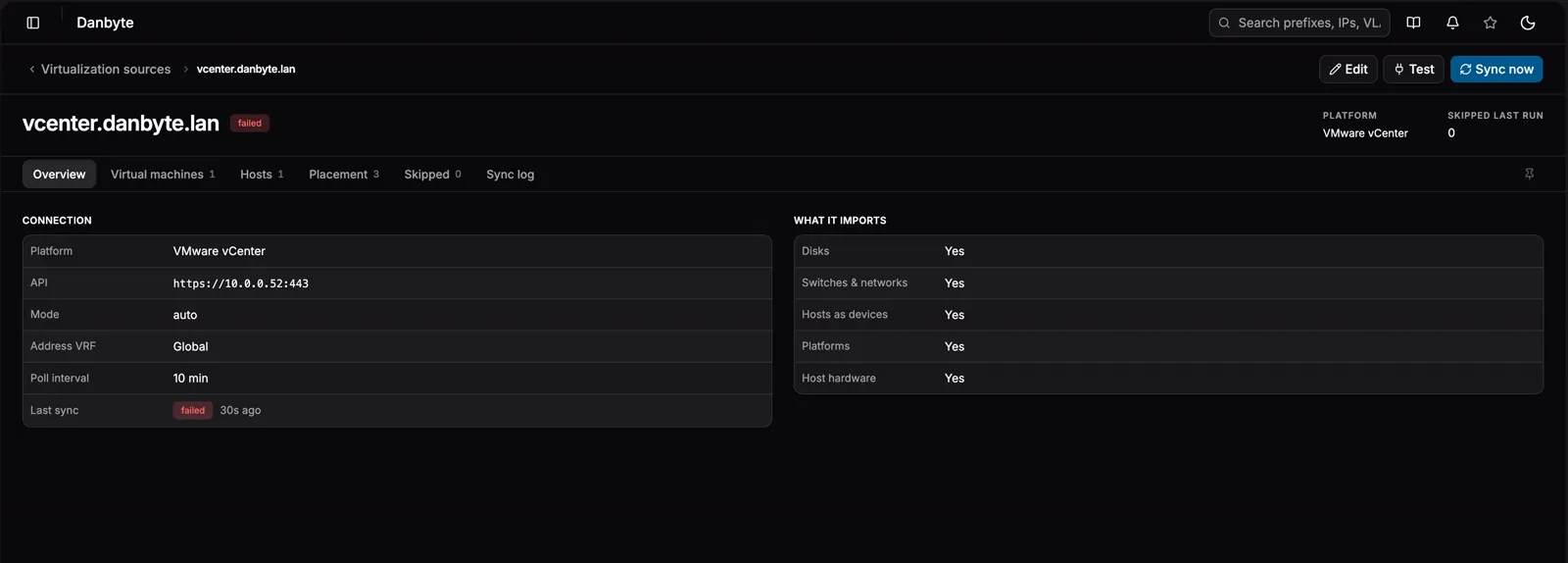
Everything is blank-fill: a device you already model is linked and completed, never restyled. Your serial stays your serial.
Placement: which site does this machine belong to?
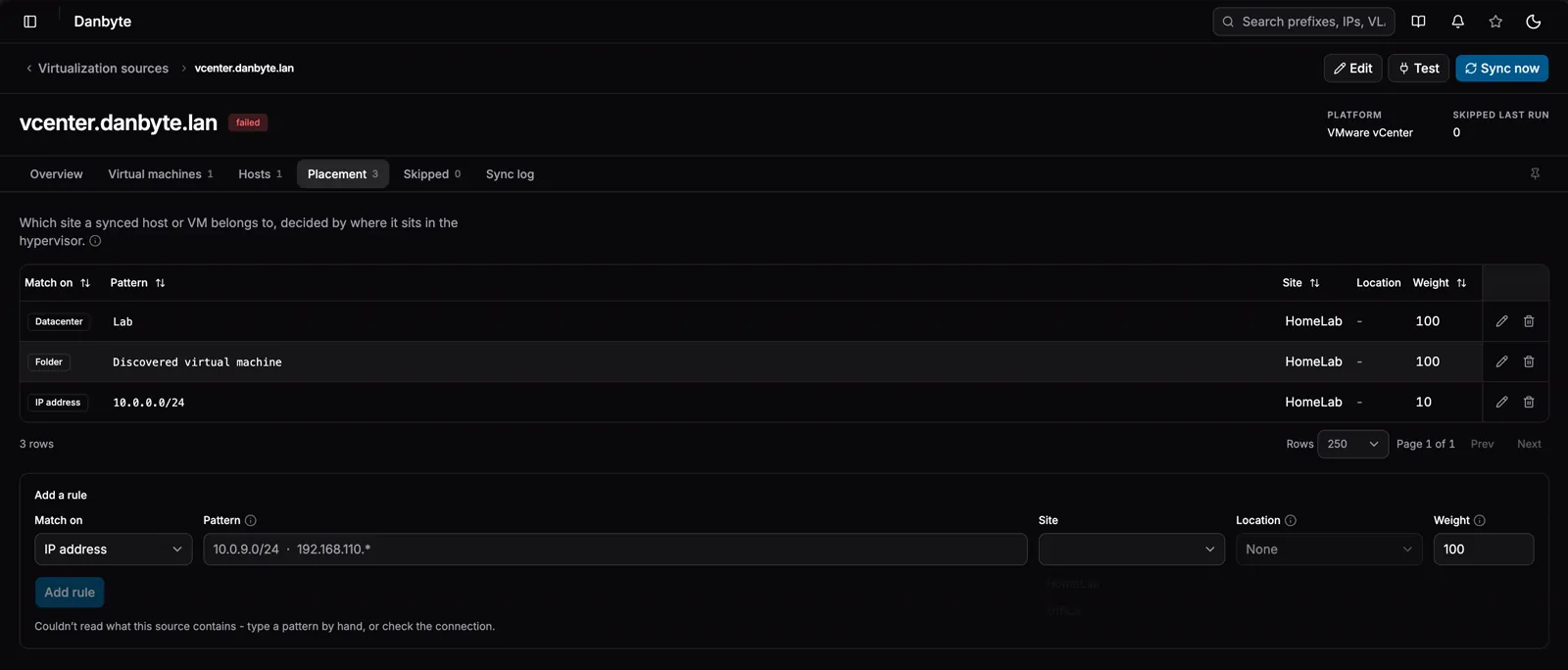
The hypervisor already knows where things sit - a datacenter, a folder tree, a cluster, a host. 0.13.0 turns that into placement rules: each rule matches one part of the hierarchy with a glob (or regex:), and points at a site you already have.
| Match on | Example |
|---|---|
| Datacenter | Lab* |
| Cluster | *-DR |
| Folder | Test site - covers everything nested under it |
| Host | regex:^esxi-0[12]$ |
| IP address | 10.0.9.0/24 or 192.168.110.* |
That last row came straight from an issue - "192.168.110.* = UA, 10.0.9.* = RS": management subnets are per-site in most estates, so an address is a legitimate way to say where a machine lives. Write it as a CIDR where you can; a glob only reaches octet boundaries, and nothing but 10.0.12.0/22 expresses a /22. VM addresses come from the guest tools; host addresses ride along with the SOAP hardware call.
Nearest wins. Address beats host beats folder beats cluster beats datacenter, and the closest matching folder beats a distant ancestor. Weight only breaks ties within one level, so overriding a single machine never means re-thinking everything else.
With no rules at all, a site named after the datacenter (or Proxmox cluster) still catches its machines - the hierarchy is the implicit last rule. Two things placement will never do: invent a site (rules point at real sites; unmatched names are reported on the source's Last sync badge, not conjured into existence) and overwrite a site you set - blank-fill, like everything else the sync writes. The rule editor even offers the source's real datacenter, folder, cluster, and host names as one-click chips, read live - because a hand-typed pattern that matches nothing looks identical to no rule at all.
VM networks that actually render
The VM page's network topology had a blind spot with vCenter. It only drew a connection when the interface had a VLAN linked, and vCenter never reports a VLAN on a NIC, because in vSphere VLANs live on the port group, where the REST API doesn't expose them either. The result: every vCenter VM appeared to be on no network at all, however correctly the switches themselves synced.
0.13.0 fixes the whole chain:
- The sync records which NIC sits on which port group directly - the topology renders from that link, VLAN or no VLAN.
- Distributed port groups get their real names. A vDS NIC backing carries only a MoRef (
dvportgroup-1010); Danbyte now resolves it against the network listing it already fetches, so your switch is calledDSwitch-Prod, not an internal id. - Port-group VLANs are read over SOAP - standard switches from the host config, distributed ones from the port-group config - so vCenter interfaces get their access VLAN blank-filled exactly like Proxmox always did. No pyvmomi? Networks still map; only the VLAN enrichment sits out, and the sync says so.
And the empty state is honest now: it no longer tells you to enable a sync you already have enabled.
A page for every DNS name
DNS names used to be dead text - on the IP page, the device page, in every table. Now every DNS name is a link, and it opens a page for that name: the addresses it resolves to (round robin is many rows for one name, and that's the point), every record type across every zone, a split-horizon callout when the same name answers differently per zone, and one-click Add to IPAM / Assign IP actions.
The page is keyed on the name, not a record row - records are keyed on zone + name + type + value, so repointing an A record replaces the row and its id. Names outlive values; links should too. Names that only reverse-DNS knows about get a page as well, so nothing links into a void.
Reverse DNS itself grew up: PTR lookups can use explicit nameservers per tenant - queried directly, so the Danbyte host needs no DNS of its own, which is the whole point on a split-horizon network. And because PTR is the one lookup whose right answer depends on where you ask from, an Outpost can now resolve locally with its own resolvers and report the name back. A branch office resolves like the branch, not like the datacenter. (Pairs with Outpost v0.7.0.)
A dashboard you can shape
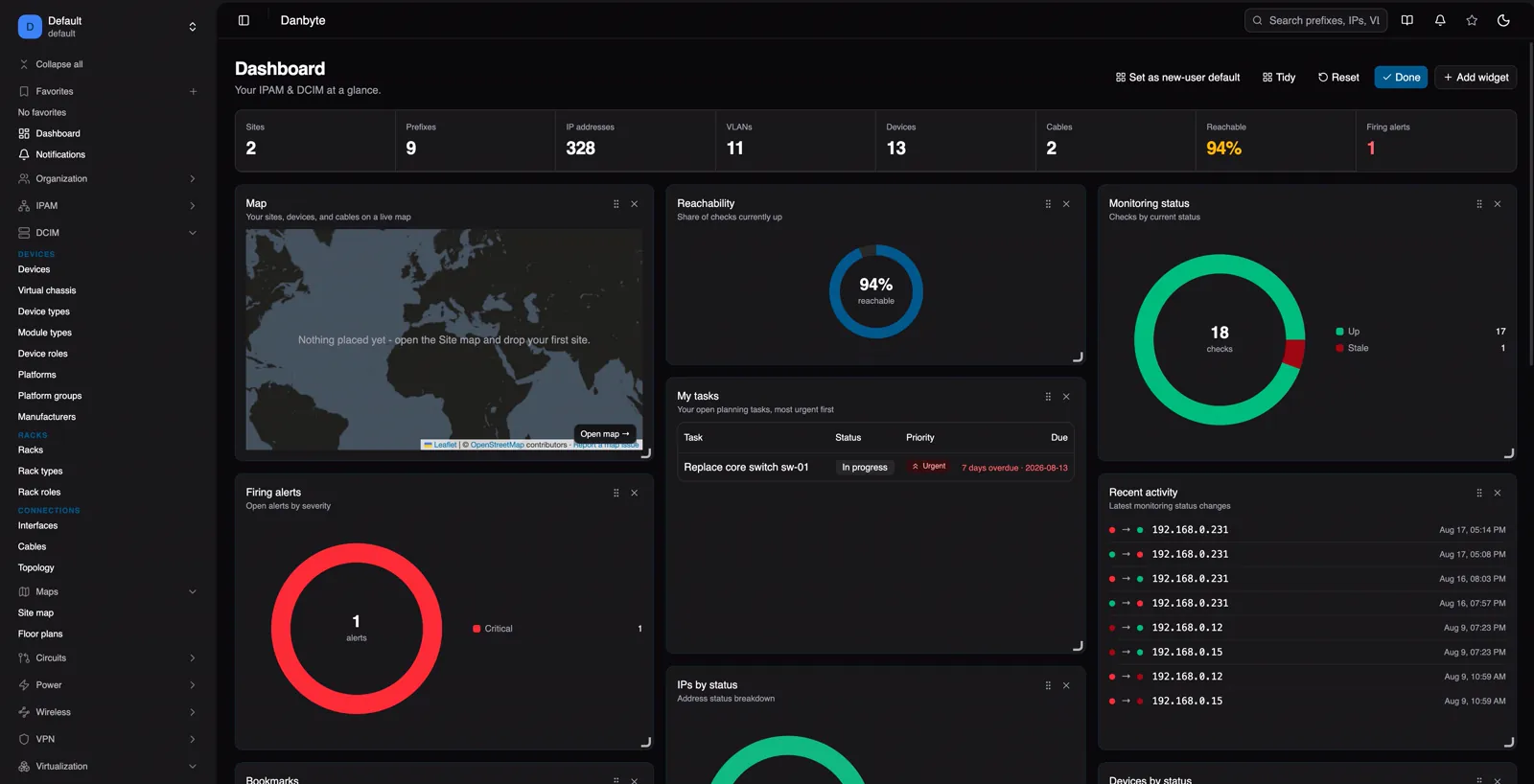
The masonry is gone. Widgets now live on a real grid: drag the handle to move, drag the corner bracket to resize, snapping to cells with per-widget minimums and maximums - the changelog goes full-width, a donut shrinks to a single column, charts scale with their tile instead of floating small in the middle.
The packing logic took four iterations to get right, and it comes with a guarantee: rows fill their full width at a uniform height, so holes are impossible after a Reset, and a Tidy button re-packs your own arrangement in one click when dragging has left gaps.
Your layout is saved to your account, not the browser: it follows you across machines, old layouts migrate in place, admins can publish a starting layout for new users, and Reset walks the chain - your layout, the tenant default, the built-in. The floor-plan widget picks which plan it shows and can be placed once per floor.
Drift grows teeth
SNMP drift already caught a device disagreeing with its source of truth. The virtualization side now does the same for interface fields: a MAC, MTU, or VLAN that differs between Danbyte and the hypervisor lands in the review inbox as a per-field diff - yours → theirs - with an amber badge on the interface itself.
Accept to take the hypervisor's values; edit to keep yours; the flag clears itself when the two agree. Three things are deliberately not drift: a field the hypervisor never reports (silence is not a contradiction), a field that's blank on your side (that's blank-fill, as always), and a MAC written in a different case or separator style.
The sync writes its own bug report
Every virtualization source keeps a Sync log tab: each VM created or adopted, every interface, switch, network, VLAN, link, placement, and prune the run performed - plus every warning - as a sortable, exportable table with a copy button per line. Rolling history across runs, so the lines before a failure are still there when you need them.
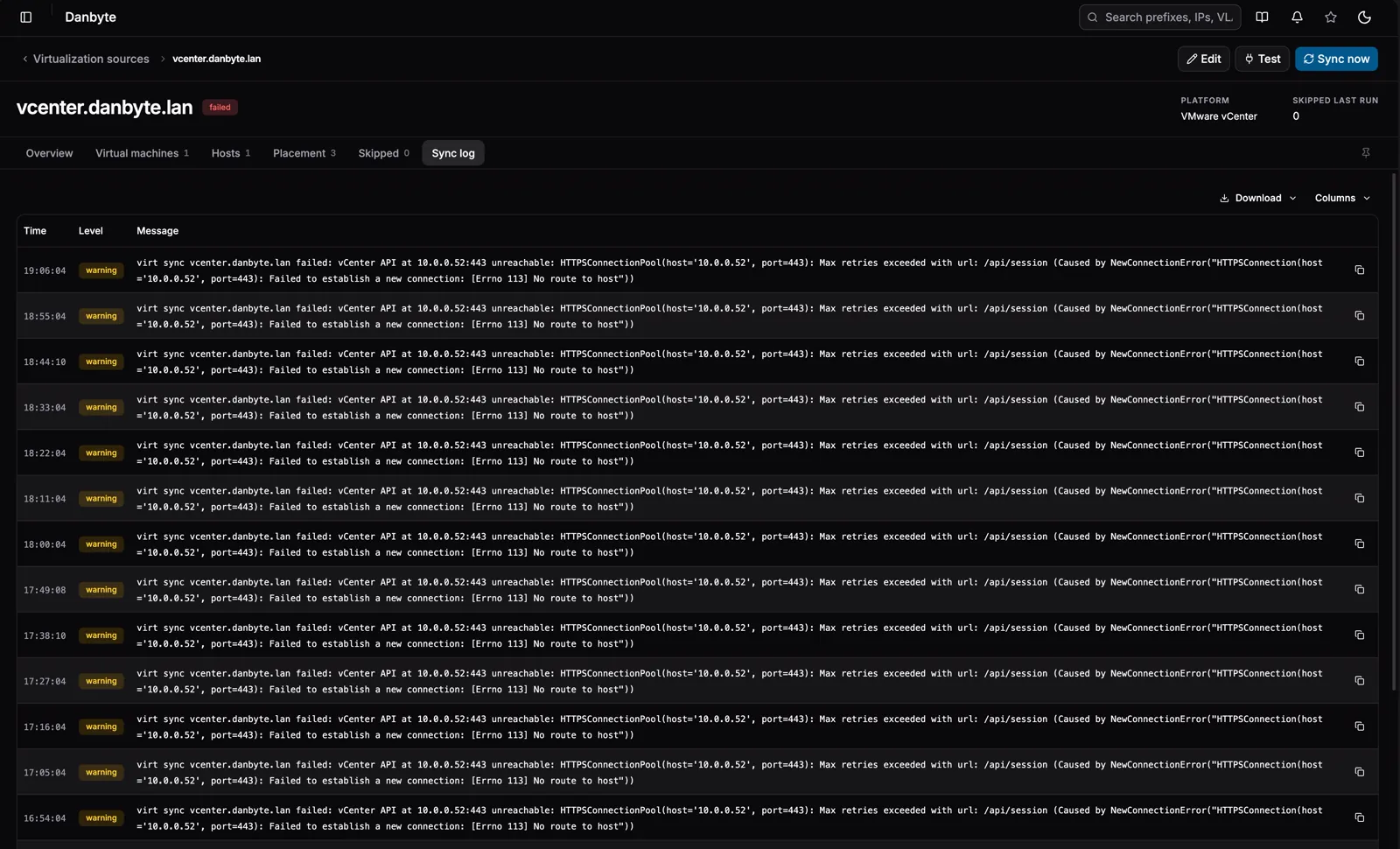
When something goes wrong, "open the source, copy the log, paste it in the issue" replaces "ssh into the right container and grep." The same lines flow to the journal and /var/log/danbyte for operators who live in a shell.
Linkage & quality of life
The rest is a long tail of things that make the daily grind smoother:
- Search boxes search now. The pickers fuzzy-matched against internal ids, so searching a unique
SW07cheerfully listedSW05andSW06too. Matching is now whole-term substring over names and real slugs - ids are out of the game entirely. - The device type field is a real picker - search by name, model, or part number; filter by manufacturer, platform, tag, and artwork (a rack elevation only draws for a type that has images, so "which of these will render" is a fair question).
- Prefixes validate their input. A bare
10.0.0.1used to save and then haunt the install - invisible in the tree, counted on the dashboard. Now it's rejected with the CIDR you meant, everywhere including bulk import, and existing ghosts are repaired on upgrade. - VM power state shows as a quiet outline badge beside the lifecycle status - vCenter owns one, you own the other - and platforms fill from the guest OS, matching your existing catalog before minting anything.
- Multiple ARP sources for switch-link suggestions: tenants with more than one L3 firewall merge their tables, deterministically.
- Sidebar collapse-all / expand-all, IPs assignable on VM interfaces, tenant deletion fixed and regression-tested, the drift popover stopped painting outside its frame, and the device Config tab stopped crashing on first open.
- Container installs refuse the in-app self-upgrade - a process inside a container can't rebuild its own image, so the upgrade could only ever half-apply. The Updates page now says so and hands you the compose commands instead.
Install
A fresh Ubuntu or Debian box to a running instance in one line - it resolves the latest release, verifies the checksum, and provisions PostgreSQL, Redis and nginx + TLS:
curl -fsSL https://danbyte.net/install.sh | bash -s -- --host danbyte.example.com
Upgrading from 0.12.x is a normal upgrade - forward migrations only, applied automatically; restart your workers after. Docker and Podman installs upgrade from the host (git checkout v0.13.0, then docker compose -f docker-compose.prod.yml up -d --build). Outposts pair with v0.7.0, which also brings the current check engine to remote sites.
See the full changelog for every fix and smaller change in 0.13.0.